
Protection against XSS vulnerabilities with CSP headers (Content Security Policy)
XSS vulnerabilities (Cross-Site Scripting), in 3rd position of the last OWASP TOP 10, are a door to get into IT systems (ports scanning, exploits, etc.) and a threat for users (authentication information theft). Traditional countermeasures are input filtering and output encoding to avoid executions of malicious scripts on users computers.
Principe
Another way to protect against this kind of vulnerabilitiy is to set up the Content-Security-Policy HTTP header to define the strategy to control contents downloaded by the web page. The CSP principle is to enumerate a white list of allowed sources used for javascript, CSS, fonts, form POST, AJAX requests, etc.
Continue readingWindDBG : load right extensions
In order to debug .NET applications, Microsoft provides a tool called WinDBG available in “Windows SDK”.
WinDBG is a native debugger and need additional extensions to work with .NET application. These extensions are different based on technology and .NET version (Silverlight / WPF / .NET 2.0 / .NET 4, etc.).
SOS
SOS.dll (Son Of Strike) is a DLL provided by .NET Framework and is available in folder :
C:\Windows\Microsoft.NET\Framework\
The DLL loading is slightly different if your application is a classic .NET 4 application or Silverlight application. Actually Silverlight uses only a subset of .NET Framework based on coreclr.dll and not clr.dll (mscorwks.dll for .NET 2.0). The extension module to load is not the same (clr for .NET 4 and coreclr for Silverlight).
Continue readingXAML Spy Useful tool for XAML developers
Released in June 2012, XAML Spy, Silverlight spy successor, is a tool to facilitate XAML developers life (Silverlight, Windows Phone and WinRT).
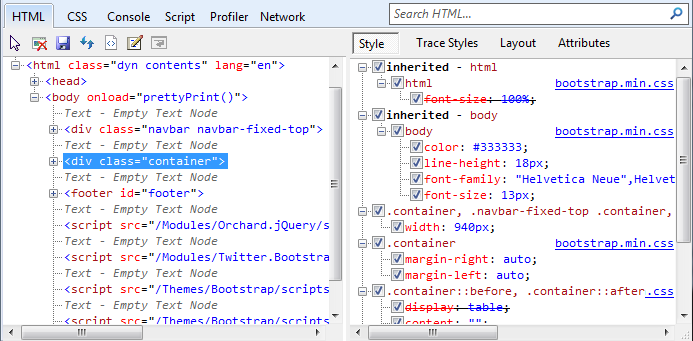
If you’re used to develop with HTML/CSS, you may know “developers tools” from Internet Explorer 9 or Chrome, which allow you to select elements in the web pages, find associated CSS properties and edit them on the fly in order to view the result in the browser.
Use Visual Studio debugger in client side partial classes created on WCF proxy
In application using WCF service, it is not uncommon to create partial classes on client side in order to add properties on objects retrieved by the service. Theses properties are needed by the client application (for interface for example) and they have no reason to present on server side.
For instance, a class name Product has following properties defined on server side : Price, Name, Stock and has the property IsVisible defined on client side in order to display or not the product on UI. Methods can also be defined in these partial classes.
Continue readingGeek comics : 1st Windows Phone application
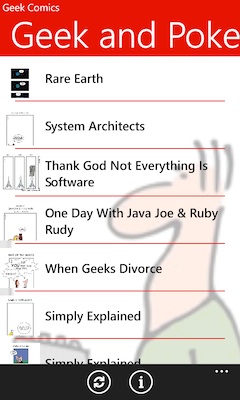
Here we are, my 1st “real” Windows Phone has just been published to Marketplace. This application allows you to read Geek and Poke and xkcd comics.
This 1st version is very basic but it was a good occasion for me to learn more about this domain.
If you find a bug or have suggestions for next versions, don’t hesitate to contact me.

Put on attribute per line in XAML files in Silverlight
A XAML file can be unreadable when there are a lot of attributes in controls. Lines are often too long to be displayed on screen (horizontal scrollbar is required).
Visual Studio 2010 offers an option allowing us to put one attribute per line automatically to facilitate code reading. So, when you have written your code, press Ctrl+K+D to format XAML.
To activate this option, go to Tools -> Options, then open Text Editor -> XAML -> Formatting and select Spacing.
Continue readingHow to use mouse wheel on Silverlight and Chrome when Windowless is enabled
In Silverlight, the mouse wheel works very well with every main browser (Internet Explorer, Firefox, Chrome, etc.) but not when Windowless is enabled. When this feature is enabled, NAPI based browsers like Chrome or Firefox don’t allow Silverlight to manage the mouse wheel. This article explains how to get the mouse wheel event using DOM.
This article is based on code published on Compiled Experience but I’ve added some modifications to consider elements inherited from ItemsControl.
Continue reading